
Recording a podcast takes more than turning on a microphone. Whether you’re planning your first episode, interviewing a guest, or starting a regular show, a little preparation can make the session run more smoothly.
Before you record, there are five things worth understanding: what equipment is available, what you need to bring, how you’ll structure your episode, how you’ll save your files, and how to use the recording setup.
You don’t need to be an audio expert to get started. You just need to know what to expect.
1. Know What Equipment Your Recording Setup Provides
Your equipment needs will depend on where and how you’re recording.
If you’re recording at home, you may need to arrange your own microphones, headphones, recording software, and a suitable recording space.
If you’re renting a podcast studio, some of that equipment may already be available.
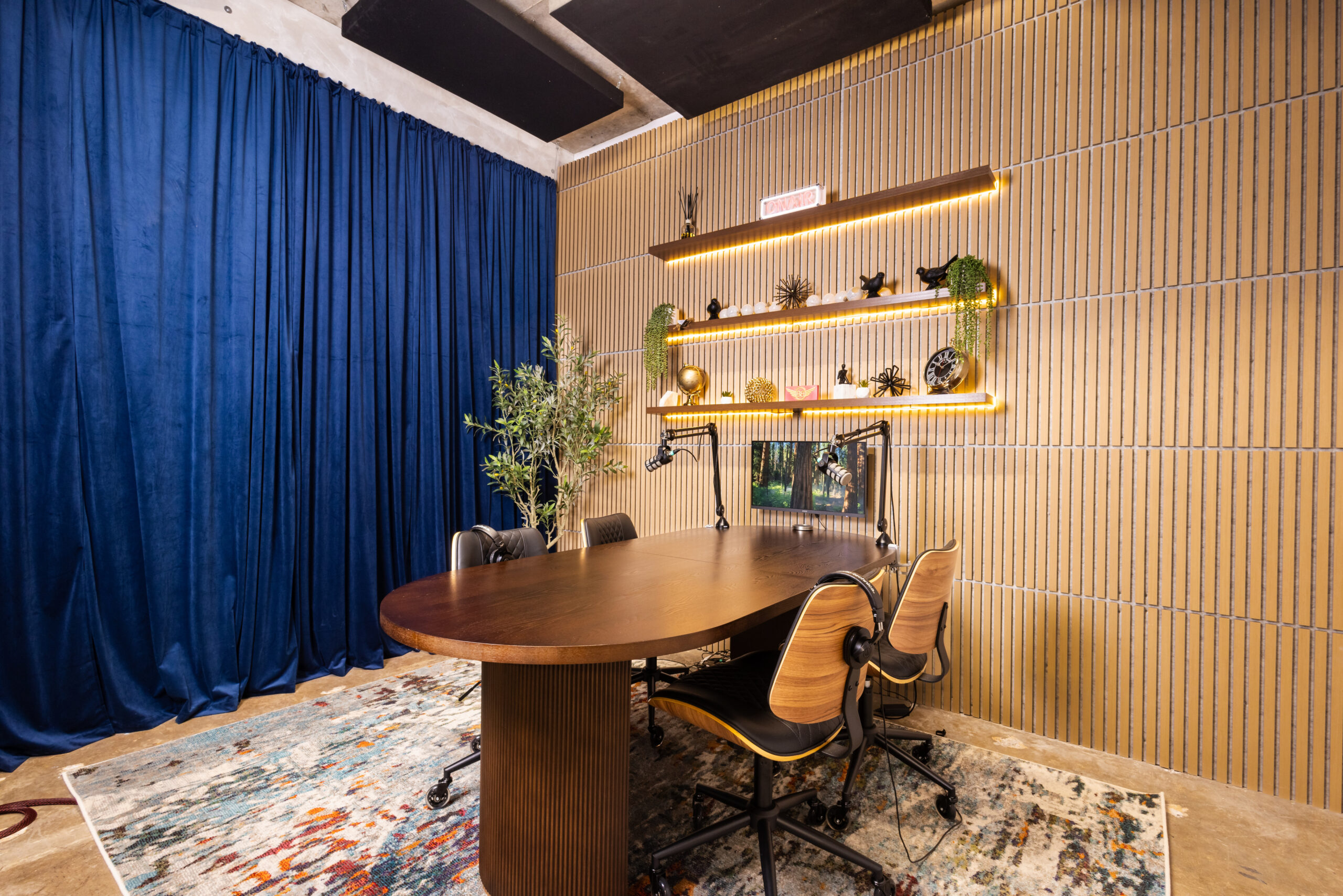
At Band Barracks in Houston, Podcast Studios 106 and 109 offer dedicated recording spaces for conversations and interviews, with rates starting as low as $19/hour during economy hours.
Both studios are equipped with:
- Two PreSonus PD70 microphones with adjustable boom arms.
- A RØDECaster Pro II podcast production console.
- Two Audio-Technica ATH-M20x monitoring headphones, or equivalent.
- Mood lighting.
- Comfortable seating and a mobile interface/TV connection.
These setups provide a starting point for conversations and interviews without requiring you to assemble an entire podcast recording system.
Before booking, check how many microphones and headphones are available, whether the space accommodates your guests, and what additional equipment your recording plans might require.
Planning to record a video podcast? Cameras aren’t included with standard Band Barracks Podcast Studio rentals, but you have another option. Book an engineer-assisted podcast session and get a setup with up to three cameras, assistance during recording, and basic cleanup/editing. It’s a convenient way to record video without arranging your own cameras. Full post-production editing is not included.
You can compare the available setups on the Band Barracks Podcast Studio page.
2. Confirm What You Need to Bring
Having professional recording equipment available doesn’t necessarily mean everything required for your particular recording workflow is included.
You may need a compatible storage device, laptop, connector, or another accessory depending on how you intend to record.
At Band Barracks, we’ve welcomed hundreds of first-time podcasters. We’ve also encountered customers who arrived without realizing they needed certain items for their intended setup.
One important item to plan for is your recording media.
If you’re recording directly to a microSD card using the RØDECaster Pro II, you have three options:
- Bring a compatible, properly formatted microSD card that’s ready for recording.
- Bring a compatible microSD card that needs formatting. You can format it using the console at the beginning of your session.
- Purchase a microSD card at Band Barracks if you don’t already have one.
Formatting a card erases its existing contents, so back up anything important before formatting it.
If your recording method uses a laptop or another device, confirm the connections and requirements for that workflow instead of assuming a microSD card is always necessary.
Before arriving, make sure you know which recording method you’ll use and what you need to bring.
That way, you can spend your reserved time recording instead of sorting out missing equipment or incompatible accessories.
3. Prepare Your Episode and Allow Enough Recording Time
A good podcast doesn’t need to sound scripted. But it helps to know where the conversation is going.
Before recording, decide what your episode is about and what you want listeners to take away from it.
If you’re interviewing a guest, think about the questions that will guide the discussion. Share the general topic with your guest so they know what to expect.
A simple episode outline might include:
- Introduction: Who are you, and what is this episode about?
- Main discussion: What are the important questions or talking points?
- Supporting details: Are there examples, stories, or experiences worth discussing?
- Closing: What should listeners remember when the episode ends?
You don’t need to write every word. An outline should help you stay organized while leaving room for natural conversation.
It can also help to practice your introduction, read your questions aloud, and estimate how long different parts of the episode might take.
Remember to allow time to get settled, check your equipment, and prepare your recording setup.
If your booked session is one hour, that doesn’t necessarily mean you’ll have a full hour of finished podcast content.
Consider booking a longer block if your episode needs more preparation or recording time. Band Barracks offers discounted block rates that can help you save compared with booking the equivalent time at standard hourly rates, while giving you more room to settle in, record, and review your session without rushing. Check the current options when booking.
The goal is to arrive with enough direction and enough time to focus on the conversation.
4. Know How You’ll Save, Retrieve, and Edit Your Recording
Before pressing record, know what will happen to your audio files.
You need to understand how the recording will be captured, where the files will be saved, and how you’ll access them afterward.
Depending on your recording method, your audio might be saved to a compatible microSD card or another connected device.
Before the session, confirm:
- Where your recording files will be saved.
- How you’ll retrieve those files.
- Whether you’ll have the files needed for your planned editing workflow.
- How you’ll make a backup after recording.
It’s also worth deciding how you’ll handle editing.
You may want to trim unnecessary interruptions, improve transitions, adjust audio levels, or prepare the finished episode for publishing.
Not every pause needs to be removed. Natural conversation is part of what makes many podcasts engaging.
And while editing can improve a recording, it can’t always fully repair poor audio.
That’s why it’s better to understand your recording and file-handling process before the session rather than trying to solve problems afterward.
Before leaving, confirm that your recording was saved successfully and that you can access the files.
5. Learn the Recording Basics Before You Start
If it’s your first time using a podcast studio, the recording controls may look unfamiliar.
Band Barracks Podcast Studios 106 and 109 use the RØDECaster Pro II, which lets you manage microphone channels, monitor audio, and record to compatible storage.
You don’t need to learn every feature before recording. Focus on a few essentials.
Prepare Your Recording Setup
If you’re recording to microSD, make sure your compatible card is inserted, recognized, and ready to use.
Check that the microphones are connected and positioned comfortably for each speaker.
Check Your Microphone Levels
Have everyone speak at a normal conversational volume while checking the audio level meters.
Listen through headphones to make sure each voice is clear and that no one is noticeably too loud or too quiet.
If the levels need adjustment, use the console’s microphone controls or ask for assistance before recording.
Make a Short Test Recording
Before starting the full episode, record a short sample when possible.
Play it back to check that the intended microphones were captured and that the audio sounds clear.
This gives you a chance to catch obvious problems before recording the conversation.
Confirm Recording and Save Your Files
Once your setup is ready, start the recording using the console’s recording controls.
Check the recording status to confirm that recording has actually started.
When you’re finished, stop the recording using the console’s controls and confirm that the file was saved successfully.
Before leaving, make sure you know how to access or retrieve the recording.
You don’t need to become an audio engineer to record your podcast. Understanding these basics helps you focus on the conversation rather than the equipment.
Podcast Recording Checklist: Before You Hit Record
Use this checklist to prepare for your next podcast session.
Before booking
- Confirm the number of speakers and equipment available.
- Check whether the space supports your planned audio or video setup.
- Consider engineer-assisted recording if you need a camera setup.
- Compare hourly bookings and block rates if you’ll need extra time.
Before arriving
- Prepare your episode outline and interview questions.
- Bring a compatible microSD card if your recording workflow requires one, or plan to purchase one at Band Barracks.
- Confirm any laptop or connector requirements.
- Share relevant episode details with your guests.
Before recording
- Confirm that your recording media or connected device is ready.
- Check microphone positions and audio levels.
- Listen through headphones.
- Make a short test recording when possible.
- Confirm that recording has started.
Before leaving
- Stop and save the recording.
- Confirm that your recording files are accessible.
- Make a backup when you’re able to do so.
A little preparation can make your first podcast recording feel much more manageable.
Ready to Record Your Podcast in Houston?
Whether you’re recording your first episode or preparing for your next interview, having a dedicated recording space can help you focus on your content.
Band Barracks offers podcast studios in Houston with recording equipment, dedicated setups, and 24/7 access.
Explore Band Barracks Podcast Studios to see the available rooms, recording options, and current booking rates.
Want to see the space before booking? You can also schedule a free studio tour.